
Purpose:
I love specific aspects of LLMs… Except for the data-security/privacy perspective of sending EVERYTHING up to a 3rd party server in the cloud. As much as I utilize Claude for various things, I really would prefer not to be calling out to a server if I create integrated LLM applications in my local environment and file systems. One of my long-term goals is to have a fully self-hosted AI assistant for data sorting and logging which includes not only my extensive markdown notes but also images, videos, and media.
This project is my first attempt at seeing what it takes to get something “functional” with minimal hardware (a $300 dell Optiplex) and very simple expectations.
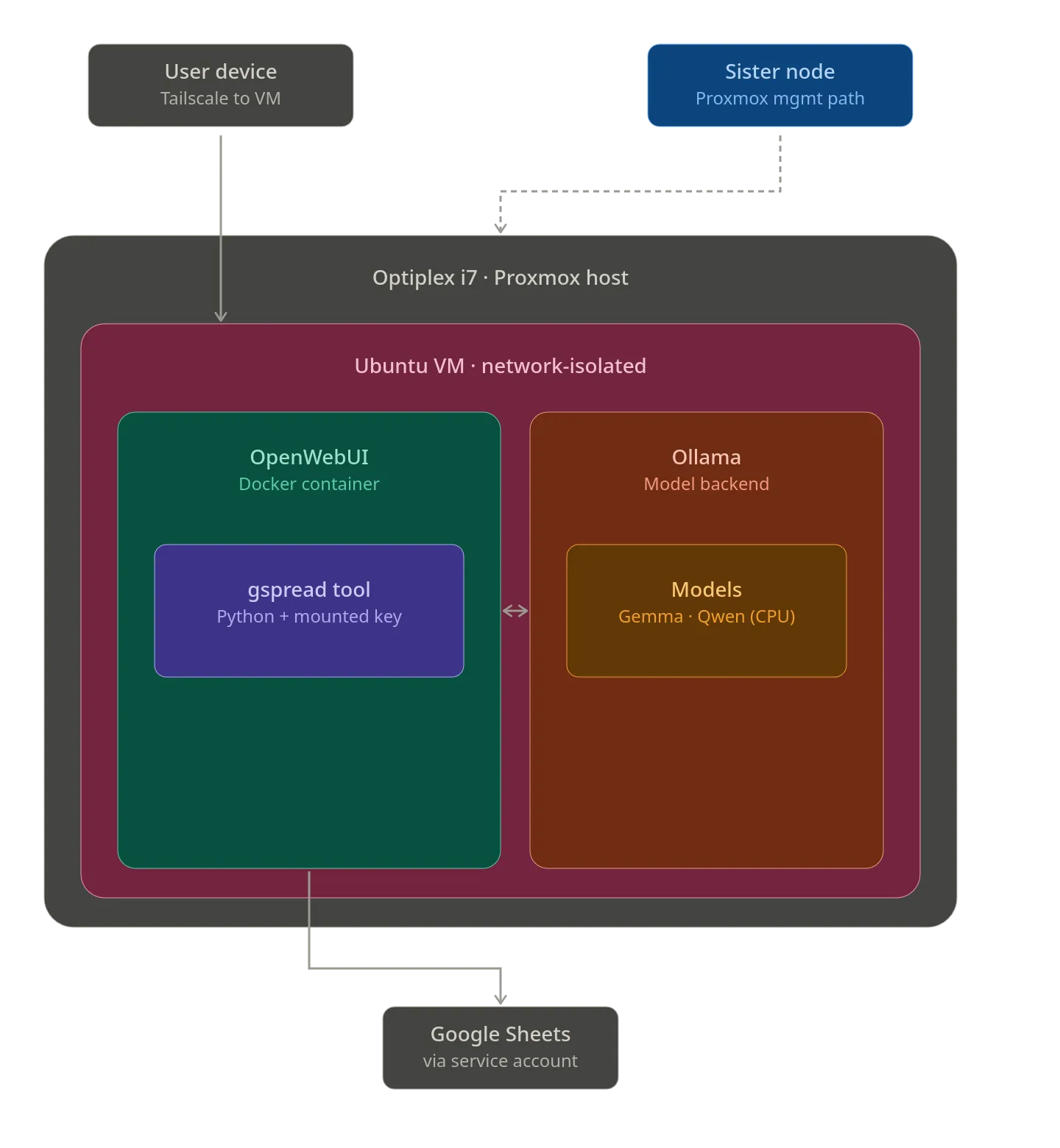
Project Content:
- Infrastructure/Software build out
- utilizing Virtualization and Docker to properly isolate and iterate on a self-hosted solution.
- Using Ollama for running a model and OpenWeb UI for tooling.
- Properly isolating LLM from local home network
- Linux Bridge Isolation via ProxMox
- AI Hosting and building
- Optimizing Tooling for exceptionally small LLMs on very limited hardware (pure CPU play).
- Building tooling to minimize token utilization in order for operation.
- playing with
Gemma 4:E2Band learning the limits of it’s context in a local environment. - Integrating local LLMs with a 3rd party API and creating API Calls for the LLM to use in order to answer my requests (in my case, Google API for spreadsheet lookups).
Value Added:
- Experimentation with self-hosting a model and providing secure remote access
- understanding the capabilities/limitations of current models and tooling
- Getting a deeper understanding of Self-Hosting on ProxMox
- Digging more proper network segmentation and verification of signal blockage
Functionality:
- Remotely access my locally-hosted LLM via a Tailscale VPN connection
- chat in a “ChatGPT” like interface using OpenWeb UI
- request something (such as the value of a point in a spreadsheet), provide the tooling, then watch as the computer ramps up for 5 minutes to run off and find that information.
- The capability to Swap out various models on the backend with Ollama
- INSERT ONE OF THE AI CONVERSATIONS HERE
- witnessing the full logic of the model play out in real time and seeing how my edits to prompts affect the underlying logic/training that the model uses.
Few Thoughts:
Fundamentally, the biggest boundary I hit with having a simple bot to do tool calls and other things is the token-generation. With only mid triple digit per second token generation I found myself getting quickly ham stringed. On top of this, the context window of these micro models also means that it’s hard to keep a consistent conversation going.
However, there was a lot of really cool insights I picked up! Such as the Context of API calls having a HUGE impact on general efficiency… I will revisit this project once I am able to get at a Graphics Card with 12 GBs of integrated VRAM (so a high 3000+ NVIDIA Series) or potentially a Framework Desktop. With that level of compute the functionality will skyrocket and I will be able to create more effective tooling and have a much larger context window.